

Find your next action
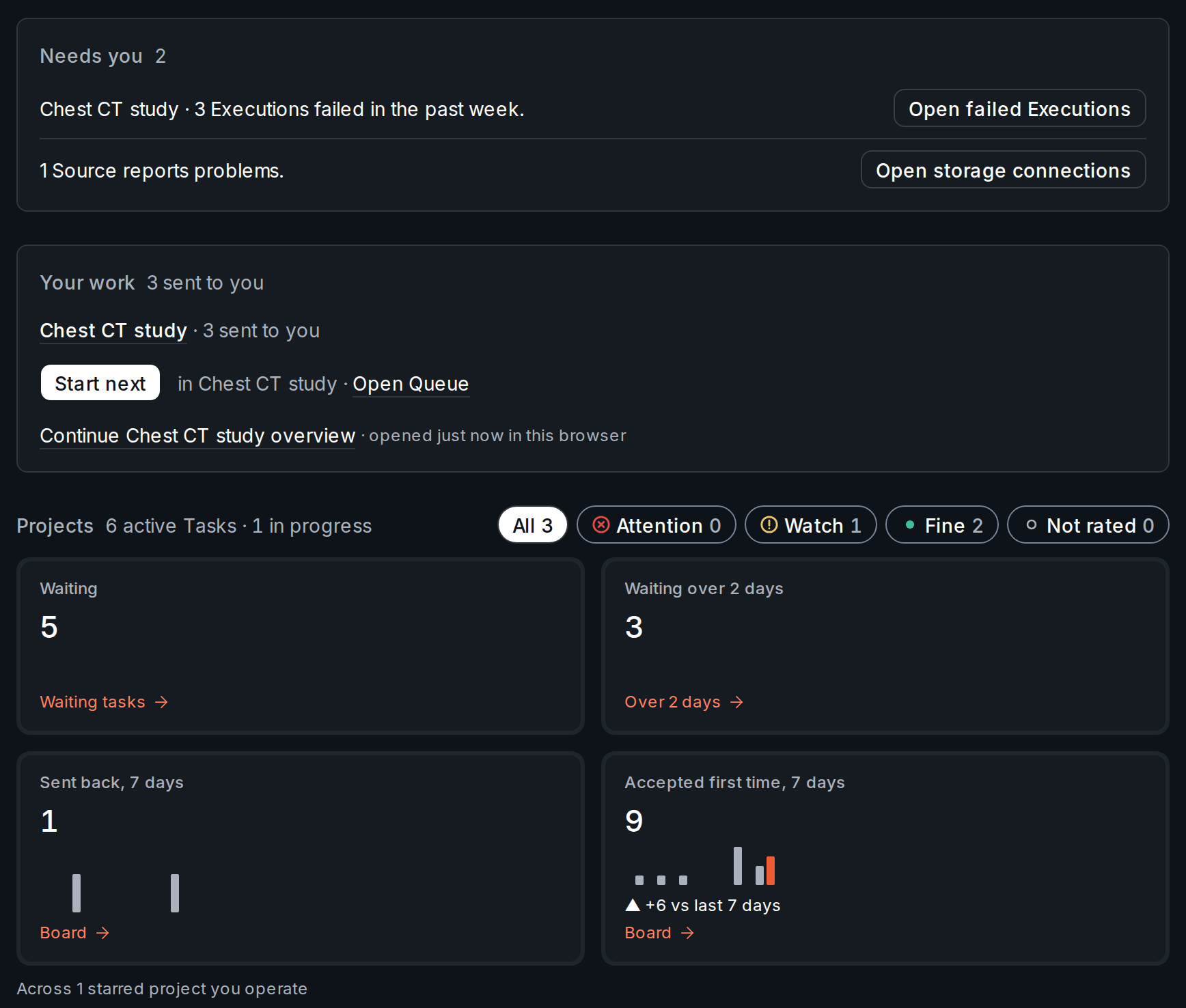
operate rung on a project, Needs you comes first. With only the contribute rung, Your work comes first.
- Read Needs you. It lists what you can clear, and the number beside the heading counts its rows. Each row has one button that opens the place to deal with it. For example:
- 3 Executions failed in the past week. has Open failed Executions, which opens the project’s failed Executions.
- 1 Source reports problems. has Open storage connections, which opens your team’s storage settings. The failing Sources are named under the row.
- Read Your work. Each line names a project and counts your Tasks there.
- Return to your work. If you hold Tasks, press Continue on the line that shows it. If you hold none, Start next is the filled button, with its project and Open Queue beside it. Once you have opened something in this browser, a link at the foot of the block reads Continue and names that place, such as a project’s overview.
- Read the tiles at the top of Projects: Waiting, Waiting over 2 days, Sent back, 7 days and Accepted first time, 7 days. The line under them says what they add up, for example
Across 1 starred project you operate.
Star a project
The tiles count starred projects you operate.- Open the project and press Star in its header. The button changes to Starred, and the project moves to the Starred group in the sidebar.
- Select Home. Each tile over one project links to the list or Board named at its foot.
Across 2 starred projects you operate, and the tiles link nowhere.
If Home is empty
- No Needs you block. Home leaves it out when nothing needs you.
- Star the projects you run to see their numbers here. Star a project as above.
- No tiles and no hint. With only the
contributerung, Home shows neither. - Nothing is waiting for you. Open Queue shows the Tasks you can take.
- No projects yet. Press New project.
- No projects you can open yet. An owner or admin adds you to one.
Next step
Pick up work, or set up the project that gives Home something to show.Annotate and review
Claim a Task from the Queue, label it, and see how a reviewer answers.
Plan your first project
Define one workflow, set up a workspace and complete a first dataset project.
| Plans | Team and Enterprise |
|---|---|
| Last verified | 2026-10-31 |